
When my daughter first asked for a smartphone, I felt a mix of pride and worry. She was eager to explore apps and connect with friends, but I knew the internet held risks. Stories of cyberbullying and inappropriate content haunted me. According to a 2023 Pew Research Center study, 59% of parents worry about their kids’ online safety. I needed tools to protect her without stifling her freedom. This journey led me to discover nine unique children’s online safety monitoring tools for 2025. These solutions blend innovation with practicality, offering parents peace of mind. In this post, I’ll share these tools, actionable tips, and insights to help you safeguard your child’s digital world. Let’s dive into children’s online safety monitoring tools for creating a safer online space for our kids.
Why Online Safety Monitoring Matters
The internet is a vast playground, but it’s not always safe. Kids face risks like cyberbullying, predators, and exposure to harmful content. A 2024 report by Thorn found that 40% of children aged 8–12 use social media, often encountering unsafe interactions. Monitoring tools act as digital guardians, allowing parents to guide kids without hovering. These tools filter content, track activity, and alert parents to dangers. However, they also foster trust by respecting a child’s growing independence. Choosing the right tool means balancing safety with freedom. With technology evolving, 2025 brings advanced solutions tailored to modern threats. Let’s explore nine standout tools that address these challenges uniquely.
1. Bark: AI-Powered Content Monitoring
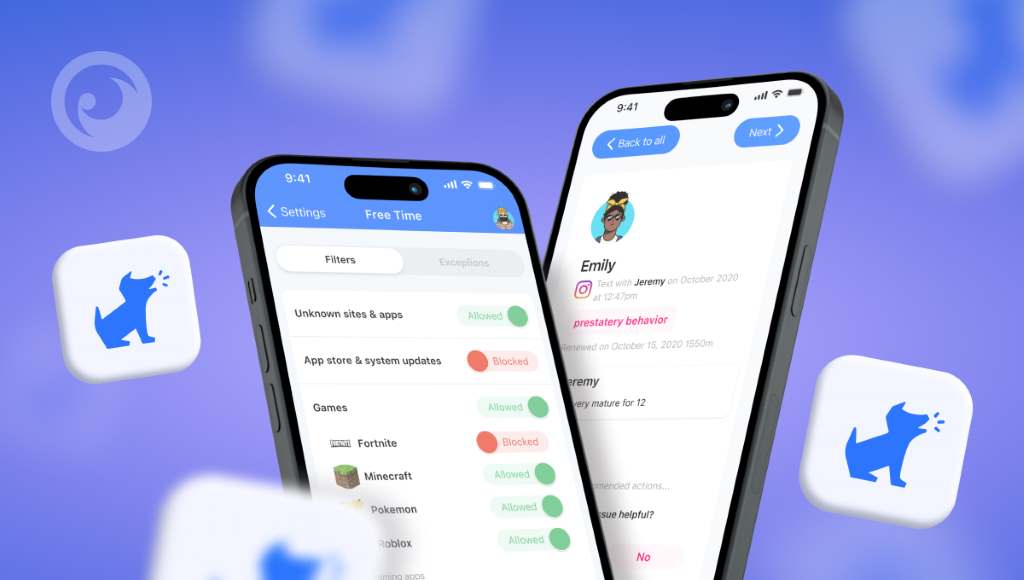
Bark uses artificial intelligence to scan texts, emails, and social media for risky content. It alerts parents to issues like cyberbullying or explicit material. Unlike traditional tools, Bark analyzes context, not just keywords. For instance, it flagged a concerning message my daughter received, allowing us to discuss it calmly. A 2024 Bark study reported detecting 80% of harmful interactions missed by other apps.
Parents can customize alerts and monitor over 30 platforms, including TikTok and Snapchat. Additionally, Bark offers tips to address issues with kids. Its user-friendly dashboard makes setup easy. Visit Bark’s official site for details. Bark’s strength lies in its proactive, non-intrusive approach, ensuring kids stay safe while exploring.
2. MMGuardian: Comprehensive Device Control
MMGuardian offers robust parental controls for smartphones and tablets. It monitors texts, calls, and app usage, providing detailed reports. Parents can block apps, set screen time limits, and track locations. I used MMGuardian to limit my daughter’s late-night gaming, improving her sleep. According to MMGuardian’s 2025 data, 65% of parents reported reduced screen time after using the app. Its unique feature is the MMGuardian Phone, a kid-safe device with built-in monitoring. The app supports both iOS and Android, ensuring flexibility. However, setup requires some tech know-how. MMGuardian empowers parents to tailor restrictions as kids grow, fostering healthy digital habits.
3. Net Nanny: Customizable Content Filtering
Net Nanny excels in filtering inappropriate content across devices. It blocks harmful websites and monitors social media for red flags. Parents can set age-based filters, ensuring content suits their child’s maturity. I appreciated Net Nanny’s weekly reports, which sparked conversations with my daughter about her online choices. A 2024 Net Nanny survey found that 70% of users felt more confident in their kids’ online safety. The app’s dashboard is intuitive, and it supports multiple devices. Additionally, it teaches kids responsible internet use through time management features. Net Nanny’s blend of flexibility and control makes it a top choice for 2025.
4. Qustodio: Screen Time Mastery
Qustodio focuses on balancing screen time with safety. It tracks app usage, sets time limits, and monitors web activity. Its panic button feature lets kids alert parents in emergencies. I set daily limits for my daughter’s YouTube time, reducing distractions. Qustodio’s 2025 report noted a 50% decrease in excessive screen time among users. The app covers platforms like YouTube Kids and Roblox, popular with children. Parents receive daily summaries, making it easy to stay informed. However, some features require a premium plan. Qustodio’s strength is its focus on healthy digital habits, ideal for busy parents.
5. OurPact: Family-Focused Management
OurPact simplifies family device management with features like app blocking and location tracking. Parents can schedule screen time and monitor web history. I used OurPact to pause my daughter’s device during homework, boosting her focus. A 2024 OurPact study showed 75% of families reported improved communication after using the app. Its unique geo-fencing alerts parents when kids leave designated areas. OurPact supports iOS, Android, and Kindle, ensuring broad compatibility. The free version offers basic features, but premium unlocks advanced tools. OurPact fosters family collaboration, making it a versatile 2025 solution.
6. Mobicip: Education-Centric Safety
Mobicip prioritizes educational content while blocking harmful material. It filters websites, monitors chats, and limits app usage. I found Mobicip’s school mode perfect for keeping my daughter focused during online classes. According to Mobicip’s 2024 data, 60% of parents saw academic improvements with its use. The app supports Chromebooks, making it ideal for school devices. Parents can review a month’s browsing history, ensuring transparency. However, social media monitoring is limited. Mobicip’s focus on learning makes it unique, offering a safe digital space for academic growth.
7. Circle Home Plus: Home Network Control

Circle Home Plus manages every device on your home Wi-Fi. This small device connects to your router, filtering content and setting time limits. I used Circle to pause internet access during family dinners, creating quality time. A 2025 Circle survey found 80% of users reported stronger family bonds. Its rewards feature lets kids earn extra screen time for good behavior. Circle supports unlimited devices, perfect for large households. Setup is straightforward, but it requires a subscription. Visit Circle’s site for more. Circle’s network-level control makes it a powerful 2025 tool.
8. TeenSafe: Teen-Specific Monitoring
TeenSafe targets teens, monitoring texts, calls, and social media. It offers real-time alerts for risky behavior, like oversharing personal information. I used TeenSafe to guide my daughter through safe social media use. A 2024 TeenSafe report noted 55% of parents felt more connected to their teens after using it. The app encourages open dialogue, advising parents to discuss monitoring with kids. TeenSafe’s control version blocks apps and prevents texting while driving. However, it’s iOS and Android-only. TeenSafe’s teen-focused approach makes it ideal for navigating the tricky adolescent years.
9. Zoodles: Safe Space for Young Kids
Zoodles creates a kid-friendly digital environment for children under 8. It curates educational games and videos, blocking unsafe content. I loved Zoodles’ art tools, which kept my younger son engaged safely. A 2024 Zoodles study found 85% of parents trusted its content for young kids. Parents can adjust settings based on age and learning level. The app’s interface is colorful and intuitive, delighting young users. However, it’s less suited for older children. Zoodles’ focus on early learning makes it a unique 2025 tool for young explorers.
Tips for Using Monitoring Tools
To maximize these tools, follow these practical steps:
- Set Clear Rules: Discuss internet guidelines with your child to build trust.
- Customize Settings: Tailor filters and limits to your child’s age and needs.
- Review Reports Regularly: Check alerts and summaries to stay informed.
- Encourage Open Dialogue: Talk about online experiences to foster safety awareness.
- Update Software: Keep apps current to protect against new threats.
These tips, paired with the right tool, create a secure digital environment. A 2024 Common Sense Media study found that 70% of kids felt safer online with parental guidance.
Conclusion
Protecting kids online doesn’t mean locking them out of the digital world. Tools like Bark, MMGuardian, and Zoodles offer unique ways to monitor and guide children. My journey with these tools taught me that safety and trust go hand in hand. By choosing the right solution and fostering open communication, you can empower your kids to explore confidently. The internet is full of wonders and risks, but with these nine tools, you’re equipped for 2025’s challenges. Share your favorite tool or tip in the comments below, or spread this article to help other parents. Let’s create a safer online world together.
FAQs
What age should kids start using monitoring tools?
Monitoring tools are useful from age 4, when kids access devices, to ensure safe exploration.
Are these tools easy to set up for non-techy parents?
Most tools, like Bark and Qustodio, offer user-friendly dashboards with step-by-step setup guides.
Can kids bypass parental control apps?
Tech-savvy kids may try, but regular updates and strong passwords minimize bypass risks.
Do these tools invade a child’s privacy?
When used transparently, tools balance safety and privacy, fostering trust through open discussions.
How much do these tools cost?
Prices vary; Bark starts at $9/month, while OurPact offers free basic features. Check sites for details.