
Five common deed restrictions

Deed restrictions, or restrictive covenants, are binding conditions that a seller has written into a property’s deeds to restrict changes a homeowner can make to their property or to the land it is built on. They cover a vast range of issues and allow landowners to retain some control over how the land is used.
Should investors consider Hemel Hempstead?

Hemel Hempstead has long been a desirable area, offering the perfect combination of close and easy transport links to central London whilst being surrounded by unspoilt green countryside. Having seen a series of serious investments since 2017, including the £20 million Heart of Maylands development by the Hightown Housing Association, the area shows great promise as a focal point for investors as well as an excellent location for homeowners looking to combine countryside living with London access.

This looks set to continue into 2023, with many new projects on the horizon as developers seek to meet the level of demand and interest both investors and potential homeowners are putting into Hemel Hempstead. The local MP, Sir Mike Penning, has highlighted the pressure on housing demand as his most pressing issue in a recent statement which makes clear the level of demand seen in the area. While this combination creates difficulties for those seeking affordable housing, the desirability of the area should also catch the attention of investors looking for rising markets.
What makes Hemel Hempstead special?
Having close relationships with both the housing and investment markets, conveyancing solicitors Hemel Hempstead are acutely aware of the increasing demand and interest in this region of Hertfordshire. This is the result of a combination of the factors mentioned above, including current and ongoing development to increase the housing options in the area, excellent transport links that offer fast and easy connections to the wider opportunities of greater London, and a thriving business district in its own right that is able to tap into the purchasing power of those arriving with the booming property market.

Alongside these factors are the features of the area itself, which despite its close London links has quick access to a range of nature and beauty spots. With RSPB and Wildlife Trust reserves within such a short distance, it is little wonder that homeowners are seeking out an area that combines city connections with an abundance of nature reserves that offer a welcome respite and counterbalance to more central urban living.
Recent market trends
The pressures of both the cost of living crisis and rising interest rates in response to recent financial market fluctuations have also driven many landlords and buy-to-rent investors to consolidate their portfolios and focus on areas such as Hemel Hempstead. Conveyancers such as Sam Conveyancing have seen this increased interest in buy-to-rent purchasing following the natural trend towards property investment in the context of inflation, as real estate provides an excellent hedge against rising rates.
Not only this, but rising interest rates also offer potentially lucrative opportunities for existing landlords and homeowners who look to increase their equity and raise levels of rental income in line with rising house prices. This makes an area such as Hemel Hempstead, already desirable based on its location, a focal point of interest for this kind of investment portfolio.
While no-one has a crystal ball to predict the future, the combination of desirable characteristics that make Hemel Hempstead a prime focus for investors as well as the changes in the contemporary economic climate that indicate strategies that protect against inflation should be high on the agenda, it’s little wonder that investors are taking an increased interest in areas such as Hemel Hempstead that present a combination of opportunities.
shareme for pc download ✓ Fast File Transfers on Windows 7, 10, 11
Download ShareMe for PC: Fast File Sharing Made Easy
Looking for a quick and efficient way to transfer files? The ShareMe app for Windows is the answer! This file transfer software for PC allows users to send and receive files effortlessly. With the ShareMe download link, getting started is a breeze. Simply click on the link, and you’ll be on your way to enjoying seamless file sharing.
When you choose to Share Me download, you’re opting for a user-friendly experience that makes transferring documents, photos, and videos a walk in the park. Plus, ShareMe for desktop ensures that you can manage your files right from your computer, making it a versatile tool for anyone looking to simplify their file-sharing needs. Don’t miss out on the convenience of ShareMe for PC download—it’s fast, reliable, and just a click away!
Overview of ShareMe for PC
The ShareMe app is a revolutionary tool designed for seamless file sharing across various platforms. Whether you’re using Windows 10, Windows 11, or even Windows 7, the ShareMe for PC download makes it easy to connect and share files without a hitch. For those who prefer Linux, there’s also a version available, ensuring that everyone can enjoy the benefits of this fantastic app.
What is ShareMe?
ShareMe is a powerful file sharing application that allows users to transfer files quickly and securely. With its impressive ShareMe app benefits, it stands out as a reliable ShareMe alternative for PC users. The app boasts ShareMe cross-platform compatibility, meaning you can share files between different operating systems without any hassle. This makes it an ideal choice for users who work across multiple devices.
Key Features of ShareMe for PC
When it comes to ShareMe for PC, the key features are what truly set it apart. Users can expect lightning-fast ShareMe file transfer speed, ensuring that even large files are sent in a matter of seconds. Security is also a top priority, with robust ShareMe security features that protect your data during transfers.
One of the standout aspects of ShareMe is its ability to facilitate ShareMe offline file sharing, allowing users to transfer files without needing an internet connection. Plus, with regular ShareMe app updates, users can enjoy new features and improvements, keeping their file sharing experience fresh and efficient.
| Feature | Description |
|---|---|
| File Transfer Speed | Lightning-fast transfers for large files |
| Security Features | Robust protection for your data |
| Offline File Sharing | Transfer files without an internet connection |
| Regular App Updates | Continuous improvements and new features |
“ShareMe is not just an app; it’s a game changer in file sharing!” 🌟
How to Download and Run ShareMe: File Sharing on PC or Mac
Downloading and running ShareMe is as easy as pie! Whether you’re on a PC or a Mac, this file-sharing app is designed to make your life simpler. With the ShareMe installation guide, users can quickly get started and enjoy seamless file transfers.
For those using a Chromebook, don’t worry! ShareMe is also compatible, making it a versatile choice for all users.
Step-by-Step Guide for Windows 7
Getting ShareMe for PC Windows 7 is a piece of cake! Follow these steps to ensure a smooth installation:
- Download the Installer: Grab the ShareMe installer from the official website.
- Run the Installer: Double-click the downloaded file to start the installation process.
- Follow the Prompts: Just click ‘Next’ and agree to the terms and conditions.
- Complete Installation: Once installed, launch the app and start sharing!
If you encounter any ShareMe installation errors, don’t panic! Here are some ShareMe troubleshooting tips:
- Check Your Internet Connection: A stable connection is crucial.
- Reboot Your PC: Sometimes, a simple restart can fix the issue.
- Reinstall the App: If all else fails, uninstall and try again.
Step-by-Step Guide for Windows 10
For those ready to dive into ShareMe for Windows 10, here’s how to get started:
- Download ShareMe for Windows 10: Click on the download link for the 64-bit version.
- Open the Installer: Locate the downloaded file and double-click it.
- Follow Installation Steps: Agree to the terms and click ‘Install’.
- Launch the App: Once installed, open ShareMe and enjoy!
Need some help? The ShareMe app support team is always ready to assist with any questions or concerns.
Step-by-Step Guide for Windows 11
Excited to use ShareMe for Windows 11? Here’s your guide:
- Download the App: Start by downloading ShareMe from the official site.
- Run the Setup: Open the installer file to begin the installation.
- Follow the Instructions: Click through the prompts until the installation is complete.
- Start Sharing: Open ShareMe and start transferring files!
Worried about compatibility? Rest assured, ShareMe compatibility with Windows 11 is top-notch, and users can also access ShareMe web for additional features.
Technical Requirements for ShareMe on PC
Before diving into the world of file sharing with ShareMe, it’s essential to understand the ShareMe PC requirements. Knowing these requirements ensures that users can enjoy a smooth and efficient experience without any hiccups.
The app is designed to work seamlessly on various systems, but having the right specifications is key. Here’s a quick overview of what users need to keep in mind:
- Operating System: Windows 7 or later
- RAM: At least 2 GB
- Storage: Sufficient space for the ShareMe download size (approximately 20 MB)
- Processor: Dual-core or higher
Supported Windows Versions
ShareMe is compatible with several Windows versions, making it a versatile choice for users. Here’s a breakdown of the supported systems:
- ShareMe for Windows XP: While it’s an older version, users can still enjoy basic file sharing.
- ShareMe for Windows 10: This version offers enhanced features and improved performance.
- ShareMe for Windows 11: The latest version ensures users have access to all the newest functionalities.
System Requirements for Optimal Performance
To get the best out of ShareMe, users should consider the following system requirements. These will help avoid any ShareMe connectivity issues and ensure a seamless experience:
- Internet Connection: A stable connection is recommended for optimal performance.
- File Transfer Tutorial: Familiarizing oneself with the ShareMe file transfer tutorial can significantly enhance the user experience.
- Bluetooth Compatibility: Understanding the differences between ShareMe vs Bluetooth file transfer can help users choose the best method for their needs.
“Having the right setup can make all the difference in your file-sharing journey!” 🚀
User-Friendly Interface of ShareMe
The ShareMe app is designed with a user-friendly interface that makes file sharing a breeze. Users often rave about how easy it is to navigate through the app, which is reflected in various ShareMe user reviews. The layout is intuitive, ensuring that even those who are not tech-savvy can quickly get the hang of it.
Navigation and Usability
When it comes to navigation, ShareMe shines like a star! The app’s layout is clean and straightforward, allowing users to find what they need without any fuss. Here are some key aspects of its usability:
- Simple Menu Options: Users can easily access file sharing, settings, and support.
- Quick Access to Features: All essential features are just a tap away, making it efficient for users on the go.
- Responsive Design: The app adjusts well to different screen sizes, ensuring a seamless experience across devices.
For those curious about how ShareMe stacks up against its competitors, the ShareMe vs SHAREit debate often highlights its superior usability. Users appreciate the smooth experience that ShareMe offers, making it a preferred choice among ShareMe app alternatives.
Customization Options
Customization is another area where ShareMe excels. Users can tailor their experience to fit their preferences, enhancing the overall app benefits. Here are some customization options available:
- Personalized Themes: Users can choose from various themes to make the app feel more personal.
- File Organization: The app allows users to create folders and categorize files for easy access.
- Notification Settings: Users can customize alerts to stay updated on file transfers without being overwhelmed.
Moreover, ShareMe app support is readily available for users who need assistance with customization. One of the standout features is the ability to facilitate ShareMe for Android to PC transfer, making it easy to manage files across devices. This flexibility is a significant advantage for users who frequently switch between their mobile devices and computers.
Rate this App: User Reviews and Feedback
When it comes to understanding how well the ShareMe app performs, user reviews are the golden ticket. They provide insights into real experiences, highlighting both the highs and lows of using this file-sharing gem.
Many users rave about its speed and efficiency, while others share their ShareMe troubleshooting tips for common issues. It’s always good to know what others think before diving in!
Pros and Cons of ShareMe
Every app has its strengths and weaknesses, and ShareMe is no exception. Here’s a quick rundown of the pros and cons:
| Pros | Cons |
|---|---|
| Fast file transfers | Occasional connectivity issues |
| User-friendly interface | Limited support for older devices |
| Cross-platform compatibility | Some features may require updates |
“ShareMe is a breeze to use, but like any app, it has its quirks!” 😅
For those curious about alternatives, the ShareMe vs Xender debate often comes up. While both apps offer file sharing, users may prefer one over the other based on their specific needs. Additionally, if someone is looking for a ShareMe alternative for PC, there are options available that might suit their preferences better.
User Ratings and Experiences
User ratings for ShareMe are generally positive, with many highlighting the app’s benefits. The ShareMe user reviews often mention its impressive file sharing app features, such as:
- Speed: Users appreciate how quickly they can transfer large files.
- Ease of Use: The app’s intuitive design makes it accessible for everyone.
- Versatility: It works across various platforms, making it a favorite among users.
However, some users also share their experiences regarding the app’s limitations. The ShareMe app FAQ section often addresses common concerns, helping new users navigate potential issues. Overall, the feedback paints a picture of an app that, while not perfect, offers significant value in the world of file sharing.
Frequently Asked Questions
The ShareMe app has become a popular choice for users looking to transfer files quickly and efficiently. Here are some frequently asked questions that can help users understand the app better.
Is ShareMe available for Mac?
Absolutely! Users can enjoy the benefits of ShareMe for Mac, making file transfers just as easy on Apple devices. The ShareMe app support team is always ready to assist Mac users with any questions they may have.
For those who prefer using ShareMe for desktop, the app is designed to provide a seamless experience across various platforms, ensuring that everyone can share files effortlessly.
Can I use ShareMe without an internet connection?
Yes, you can! One of the standout features of ShareMe is its ability to facilitate ShareMe file transfer without internet. This means users can engage in ShareMe offline file sharing, making it perfect for situations where internet access is limited or unavailable.
With these ShareMe app features, users can transfer files directly between devices without the need for Wi-Fi or mobile data.
What types of files can I share using ShareMe?
ShareMe is versatile when it comes to file types. Users can share a variety of files, including documents, images, videos, and more. The ShareMe file sharing app features make it easy to send large files quickly.
For those looking for guidance, the ShareMe file transfer tutorial provides step-by-step instructions on how to share different file types. The ShareMe app benefits include its ability to handle multiple formats, ensuring that users can share whatever they need with ease.
Is ShareMe safe to use for file transfers?
Safety is a top priority for ShareMe users. The app comes equipped with robust ShareMe security features that protect user data during transfers. Additionally, the ShareMe app privacy policy outlines how user information is handled, ensuring transparency and trust.
Many users have shared their experiences in ShareMe user reviews, often highlighting the app’s commitment to security and privacy, making it a reliable choice for file sharing.
kmspico activator for microsoft office 2013 ✓ Activate Office 2013 Now!
Activate Microsoft Office 2013 for Free with KMSpico Activator
Activating Microsoft Office 2013 can sometimes be a challenge, especially if we want to avoid purchasing a license. Fortunately, we have the KMSpico activator for Microsoft Office 2013 at our disposal. This powerful software activation tool allows us to unlock the full features of Office 2013 without needing a license.
By using the KMSpico activator, we can easily activate Office 2013 on both 32-bit and 64-bit systems, making it a versatile solution for our needs. Whether we are running Windows 10 or Windows 11, this tool is designed to work seamlessly, ensuring that we can enjoy all the benefits of Office 2013 without any hassle.
Key Features of KMSpico Activator
- License-Free Activation: We can use Office 2013 without a license.
- Compatibility: Works with both 32-bit and 64-bit versions of Windows.
- KMS Emulation: Utilizes Key Management Service emulation to bypass the activation process safely.
- Easy to Use: The activation process is straightforward and user-friendly.
Steps to Activate Office 2013
- Download KMSpico: Find a reliable source for the KMSpico activator for Microsoft Office 2013.
- Install the Tool: Follow the installation instructions carefully.
- Run KMSpico: Launch the activator and let it do its magic.
- Enjoy Full Access: Once activated, we can use Office 2013 without any restrictions.
With the KMSpico activator, we can easily activate Office 2013 and enjoy its features without any cost. This tool not only saves us money but also provides a hassle-free experience in managing our Office software. 😊
KMSpico Technical Specifications
What are the system requirements of KMSpico?
To effectively use the KMSpico activator for Microsoft Office 2013, we need to ensure our system meets certain requirements. This ensures smooth operation and successful activation. Here’s a quick overview of the essential specifications:
- Operating System: Windows 10 or Windows 11
- Architecture: Compatible with both 32-bit and 64-bit systems
- RAM: Minimum of 1 GB (2 GB recommended)
- Disk Space: At least 100 MB of free space
- .NET Framework: Version 4.0 or higher
By meeting these requirements, we can guarantee that the KMSpico activation tool functions correctly, allowing us to activate Office 2013 without any issues.
How does KMSpico Activator work?
The KMSpico activator operates using a unique method known as Key Management Service emulation. This process allows us to bypass the traditional activation methods employed by Microsoft. Here’s how it works:
- Emulation: KMSpico mimics a KMS server, tricking the Office software into thinking it is communicating with a legitimate activation server.
- Activation Process: Once we run the activator, it automatically detects the Office installation and initiates the activation sequence.
- License Generation: The tool generates a temporary license, granting us access to all features of Office 2013.
- Seamless Experience: After activation, we can use Office 2013 without any interruptions or limitations.
This straightforward process makes the KMSpico activator an efficient solution for activating Office 2013 without a license. By understanding how it works, we can confidently utilize this tool for our activation needs.
Alternatives to KMSpico Activator
While the KMSpico activator for Microsoft Office 2013 is a popular choice, we might wonder if there are other options available. Fortunately, there are several alternative activators that can help us activate Office 2013 without a license. Some of these alternatives include Microsoft Toolkit, KMSAuto, and Re-Loader Activator. Each of these tools has its own unique features and benefits, allowing us to choose the one that best fits our needs.
Are there any other alternative activators besides KMSpico?
Yes, there are various alternative activators we can consider. Here’s a quick list of some notable ones:
- Microsoft Toolkit: A comprehensive tool that not only activates Office but also Windows.
- KMSAuto: Known for its simplicity and effectiveness in activating Microsoft products.
- Re-Loader Activator: Offers a user-friendly interface and supports multiple Microsoft products.
These alternatives can provide us with the same benefits as the KMSpico activator, ensuring we can access Office 2013 full features without a license.
Features Without a License Key
Using alternative activators, we can still enjoy several features without needing a license key. Here are some common features we can expect:
- Full Access: Unlock all functionalities of Office 2013.
- User-Friendly Interface: Most activators are designed to be easy to navigate.
- Compatibility: Many of these tools support both 32-bit and 64-bit systems, making them versatile for different setups.
- Safe Activation: They utilize methods similar to Key Management Service emulation to ensure a secure activation process.
Activation Process
Activating Office 2013 using the KMSpico activator for Microsoft Office 2013 is a straightforward process that allows us to unlock all the features without needing a license. First, we need to ensure that we have downloaded the activator from a reliable source. Once we have the tool ready, we can follow the steps to activate Office 2013 efficiently.
Detailed Instructions on Activation Process
- Download and Install: We start by downloading the KMSpico activator. After downloading, we install it by following the on-screen instructions.
- Run the Activator: Once installed, we run the activator. It will automatically detect our Office installation.
- Activation: The tool will initiate the activation process. We just need to wait a few moments while it works its magic.
- Confirmation: After activation, we should receive a confirmation message indicating that Office 2013 is now activated.
What should I do if KMSpico doesn’t work?
If we encounter issues with the KMSpico activator for Microsoft Office 2013, there are several troubleshooting steps we can take:
- Check Compatibility: Ensure that our system meets the requirements for Office 2013 compatibility.
- Disable Antivirus: Sometimes, antivirus software can interfere with the activation process. Temporarily disabling it may help.
- Run as Administrator: Right-click on the KMSpico icon and select “Run as Administrator” to give it the necessary permissions.
- Reinstall: If all else fails, we can try uninstalling and reinstalling the activator.
Legal Considerations
When it comes to using the KMSpico activator for Microsoft Office 2013, we must consider the legal implications. While this tool allows us to activate Office 2013 without a license, its legality can be a gray area. Many users question whether using such activation tools is against the law. In general, using software to bypass activation can violate Microsoft’s terms of service. Therefore, we should be aware that while we may gain access to Office 2013 full features, we might also be risking potential legal consequences.
Is KMSpico legal?
The legality of the KMSpico activator largely depends on our jurisdiction and how we use the software. In many regions, using tools that bypass software activation is considered illegal. However, some users argue that it falls under fair use, especially if they own a legitimate copy of Office 2013. Ultimately, we should weigh the benefits against the risks and make an informed decision about using the KMSpico activator.
Why Choose KMSpico?
Choosing the KMSpico activator for Microsoft Office 2013 comes with several advantages. First, it provides a license-free Office 2013 experience, allowing us to access all features without the financial burden of purchasing a license. Additionally, it offers 32-bit and 64-bit compatibility, making it suitable for various systems.
Here are some reasons why we might prefer KMSpico:
- Easy to Use: The activation process is straightforward and user-friendly.
- Quick Activation: We can activate Office 2013 in just a few minutes.
- No Cost: It’s a free solution for those who need access to Office 2013.
Compatibility
When it comes to using the KMSpico activator for Microsoft Office 2013, compatibility is key. We want to ensure that our systems can run this powerful software activation tool effectively. The great news is that KMSpico is designed to work seamlessly with both Windows 10 and Windows 11. This means we can enjoy all the features of Office 2013 without worrying about whether our operating system will support it.
KMSpico Activator for Microsoft Office 2013 on Windows 10
For those of us using Windows 10, the KMSpico activator for Microsoft Office 2013 is an excellent choice. It allows us to activate Office 2013 quickly and efficiently. The activation process is straightforward, and we can unlock the full features of Office 2013 without needing a license. With just a few clicks, we can bypass the activation process and start using Office 2013 to its fullest potential.
KMSpico Activator for Microsoft Office 2013 on Windows 11
If we are on Windows 11, we can still rely on the KMSpico activator for Microsoft Office 2013. This tool is fully compatible with the latest operating system, ensuring that we can activate Office 2013 without any issues. The activation process remains user-friendly, allowing us to enjoy all the benefits of Office 2013 without the hassle of a license. With KMSpico, we can easily access our favorite Office applications and features.
KMSpico Activator for Microsoft Office 2013 32-bit and 64-bit
One of the standout features of the KMSpico activator for Microsoft Office 2013 is its 32-bit and 64-bit compatibility. Regardless of whether we are using a 32-bit or 64-bit version of Office 2013, KMSpico has us covered. This flexibility ensures that we can activate Office 2013 on various systems without any compatibility concerns. We can enjoy a smooth activation experience and unlock the full access to Office 2013 features, making our work more efficient and enjoyable.
How to fix Android TV box not streaming?
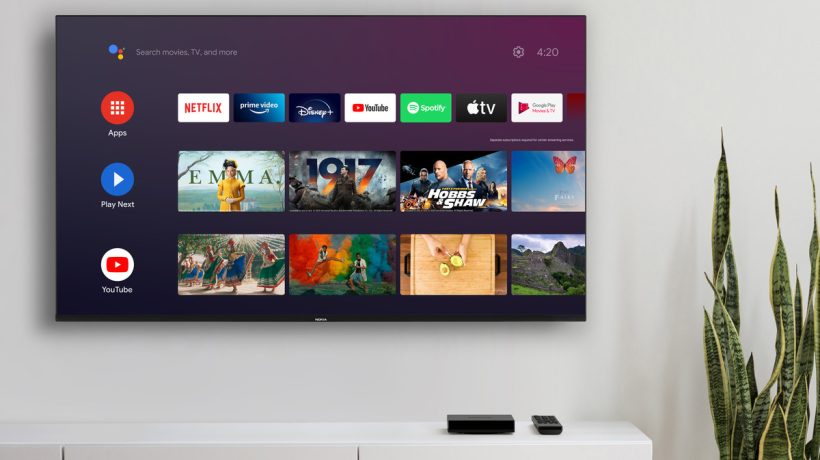
If you’ve never owned an Android TV box, it’s easy to think of them as simple devices that run apps and stream movies. In reality, they’re complex computers that must be treated with respect. Because of this complexity, many people have trouble getting their Android TV box to work properly and even more often than that, they can’t figure out why their device stopped streaming in the first place! If your box is having problems connecting to the internet or displaying video correctly, there’s a chance that resetting it will solve your problem. The content is presented by https://ltechuk.com/
The latest in facial laser

State-of-the-art protocols treat everything from dark spots to the appearance of wrinkles.
Where cosmetics cannot reach, professional treatments offer an ultra-effective solution to problems that require a more in-depth approach: injectables, for example, have become the answer not only to reshape facial volumes but also to correct imperfections such as the gummy smile, which is counteracted thanks to the inhibitory action of Botox.
Technology in medicine: past, present, and future

It is clear that technology surrounds us, and we take advantage of almost all the advantages it offers us in our day to day. From the smart mobile that allows us to access almost any information instantly to the small speaker that helps us at home with the shopping list, turns on and regulates appliances, and gives us information… it is a revolution in the personal, but also in the professional. Of course, the medical field, which is the one that interests us the most, is no less. In the last 75 years, technology in medicine has been applied with great success. Are you ready to know what is to come?
Latest technology brings to the construction sector

Despite employing large amounts of machinery, the construction sector has been one of the most reluctant to adopt the latest technology. Thus, it has been seen how areas such as the automotive industry, and logistics. Even the manufacturing industry took the lead in terms of innovation. Finally, they have not been able to resist the changes and have decided to start adopting many of the innovations at their disposal. And they won. They are not only making tasks easier but also improving supplies and solving problems that have been dragging on for a while.
Best applications to make videos

We have compiled the list of the 11 best applications to edit videos from your cell phone, whether Android or iPhone so that you can make clips that join several videos, and photos, and allow you to add transitions, filters, subtitles and music, and so you can Share with your friends. With these mobile video editors, you can quickly make videos with photos and music and share them on WhatsApp, Facebook, Instagram, and YouTube in real time.
The latest technological trends in the construction

Until a few years ago, the construction sector was one of the most traditional and reluctant to innovate. Having suffered a profound crisis caused by the bursting of the real estate bubble at the end of 2007. However, technological trends and advances and the transformation of consumer habits. And expectations force companies in this sector to reinvent themselves.