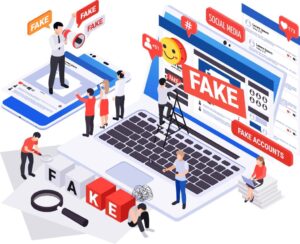
In the digital age, information is abundant—but so is misinformation. A 2023 study by Stanford University found that over 60% of adults struggle to distinguish between credible news and advertising or propaganda. The result? False beliefs, poor decisions, and a society that’s increasingly polarized. The problem isn’t just “fake news”—it’s the sheer volume of content competing for your attention, making it harder than ever to separate truth from manipulation.
I’ve spent years researching media literacy, working with fact-checkers, and teaching people how to navigate the digital landscape. The difference between those who fall for misinformation and those who don’t comes down to one skill: the ability to evaluate online sources critically. This guide isn’t about becoming a professional fact-checker. It’s about developing a mindset and toolkit to assess information quickly, confidently, and accurately—whether you’re researching for work, school, or personal curiosity.
You’ll learn how to spot red flags, verify claims, and use fact-checking tips to make informed decisions. By the end, you’ll have a step-by-step process to evaluate any online source, from social media posts to academic articles.
The Misinformation Crisis: Why You Can’t Trust Everything You Read
The Scale of the Problem: How Misinformation Spreads Faster Than Truth
A MIT study found that false news spreads six times faster than true information on social media. Why? Because misinformation is often designed to trigger emotional reactions—anger, fear, or excitement—which make people more likely to share it. Platforms like Facebook and Twitter amplify this effect by prioritizing engagement over accuracy.
Example: During the COVID-19 pandemic, false claims about vaccines and treatments went viral, leading to real-world harm. A single tweet or Facebook post could reach millions before fact-checkers could respond.
The Algorithms That Feed You Misinformation
Social media algorithms are designed to keep you engaged, not informed. They prioritize content that aligns with your existing beliefs and behaviors, creating “filter bubbles” that reinforce misinformation. A Pew Research study found that 64% of Americans believe social media has a mostly negative effect on how news is reported.
The Rise of Deepfakes and AI-Generated Content
AI tools can now create realistic videos, audio, and text that are nearly indistinguishable from real content. A 2024 report by Deeptrace found that deepfake videos increased by 900% in just two years. This makes it harder than ever to trust what you see online.
The Cost of Poor Information Literacy
Believing false information doesn’t just lead to embarrassment—it can have real-world consequences:
- Health: Following false medical advice can be dangerous.
- Finances: Falling for scams or misinformation can cost you money.
- Democracy: Misinformation undermines trust in institutions and elections.
- Relationships: Sharing false information can damage your credibility.
How to Evaluate Online Sources: A Step-by-Step Guide
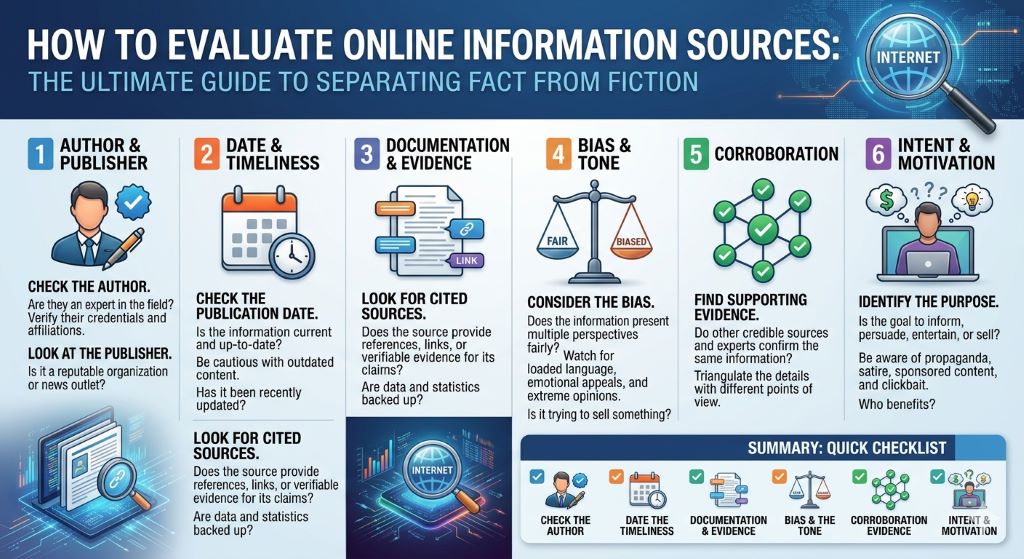
Step 1: Check the Source’s Credibility
Not all sources are created equal. Ask:
- Who is behind the information? Look for an “About Us” page or author bio. Legitimate sources are transparent about their ownership and mission.
- What is their reputation? Search for the source’s name + “reputation” or “bias.” Sites like Media Bias/Fact Check can help.
- Is the URL suspicious? Fake news sites often mimic real ones (e.g., “abcnews.com.co” vs. “abcnews.go.com”).
Example: A site ending in “.com.co” is likely a fake version of a legitimate news outlet.
Step 2: Look for Authoritative Authors and Experts
Credible information comes from qualified sources. Check:
- Author credentials: Are they an expert in the field? Do they have relevant experience or education?
- Citations: Does the article cite reputable sources or experts? Look for links to studies, official reports, or expert quotes.
- Contact information: Legitimate authors provide ways to reach them for questions or corrections.
Pro tip: Search for the author’s name on LinkedIn or Google Scholar to verify their expertise.
Step 3: Verify the Date and Timeliness
Outdated information can be misleading. Always check:
- Publication date: Is the article recent? Some topics (e.g., science, medicine) require up-to-date information.
- Last updated: Some articles are updated to reflect new developments.
- Relevance: Even if an article is old, it may still be relevant for historical context.
Example: A 2010 article on smartphone security is likely outdated in 2024.
Step 4: Assess the Evidence and Citations
Credible sources back up claims with evidence. Look for:
- Links to primary sources: Studies, official reports, or raw data.
- Balanced perspectives: Does the article present multiple viewpoints or only one side?
- Logical reasoning: Are claims supported by facts, or are they based on opinions or anecdotes?
Pro tip: Follow the citations. If an article cites a study, read the study itself to see if it supports the claim.
Step 5: Cross-Check With Other Reputable Sources
Don’t rely on a single source. Verify claims by:
- Searching the topic on Google News or Google Scholar.
- Checking fact-checking sites like Snopes, FactCheck.org, or PolitiFact.
- Looking for consensus among experts or multiple reputable outlets.
Example: If one site claims a new medical breakthrough, check if major news outlets or scientific journals report the same.
Step 6: Watch for Red Flags and Manipulative Tactics
Misinformation often uses emotional triggers and logical fallacies. Be wary of:
- Clickbait headlines: Sensational or exaggerated claims (e.g., “Scientists HIDE Shocking Truth!”).
- Lack of citations: No sources or vague references (e.g., “studies show”).
- Ad hominem attacks: Discrediting opponents instead of addressing the argument.
- False dilemmas: Presenting only two options when more exist (e.g., “You’re either with us or against us”).
Step 7: Use Fact-Checking Tools and Browser Extensions
Technology can help you evaluate online sources quickly. Try these tools:
- NewsGuard: Rates news sites for credibility.
- InVID: Verifies images and videos.
- Reverse Image Search: Use Google Images or TinEye to check if an image is altered or misused.
Example: A viral image of a “shark swimming on a flooded street” was debunked using reverse image search—it was a Photoshopped fake.
Fact-Checking Tips: How to Verify Information Like a Pro
Tip 1: Use the CRAAP Test
The CRAAP test is a simple framework to evaluate sources:
- Currency: Is the information up-to-date?
- Relevance: Does it answer your question?
- Authority: Who is the author or publisher?
- Accuracy: Is the information supported by evidence?
- Purpose: Why was it created? To inform, persuade, or sell?
Tip 2: Check the URL Carefully
Fake news sites often use URLs that mimic real ones. Look for:
- Extra words or domains (e.g., “cnn.com.co”).
- Unusual top-level domains (e.g., “.com.co” instead of “.com”).
- Hyphens or misspellings (e.g., “amaz0n-news.com”).
Tip 3: Look for Primary Sources
Primary sources are original documents or data. Secondary sources interpret or analyze them. Always prioritize primary sources when available. Examples:
- Studies: Read the original research, not just the news article about it.
- Government reports: Go to official sites (e.g., CDC, WHO) for health information.
- Interviews: Watch or read the full interview, not just a quote.
Tip 4: Be Wary of Anecdotal Evidence
Personal stories can be compelling but aren’t proof. Look for:
- Data: Statistics, studies, or surveys.
- Expert consensus: What do most professionals in the field say?
- Reproducibility: Can the claim be verified by others?
Example: One person’s experience with a diet doesn’t prove it works for everyone. Look for clinical studies.
Tip 5: Verify Images and Videos
Images and videos can be edited or taken out of context. Use:
- Reverse image search: To find the original source.
- Metadata: Check when and where the image was taken (use Exif Viewer).
- Fact-checking sites: Many specialize in debunking viral images.
Tip 6: Check for Satire or Parody
Some sites specialize in satire but are mistaken for real news. Examples include The Onion or The Babylon Bee. Always check the site’s “About” page to see if it’s satirical.
Tip 7: Use Lateral Reading
Instead of staying on the original site, open new tabs to:
- Search the author’s name.
- Look up the organization behind the site.
- Check if other reputable sources report the same information.
Information Credibility: Real-Life Examples of Misinformation and How to Spot It
Case Study 1: The “Plandemic” Video and False Health Claims
In 2020, a video titled Plandemic spread false claims about COVID-19. It used emotional language, fake credentials, and cherry-picked data. Fact-checkers debunked it by:
- Verifying the speaker’s credentials (she was not a virologist).
- Checking her claims against reputable sources (CDC, WHO).
- Noting the lack of peer-reviewed evidence.
Key Takeaway: Emotional appeals and lack of evidence are red flags.
Case Study 2: The “Balloon Boy” Hoax
In 2009, a family claimed their son was trapped in a flying balloon, sparking a media frenzy. Reporters later discovered it was a hoax for publicity. The giveaways:
- Inconsistent statements from the family.
- Lack of verifiable evidence (e.g., no footage of the boy in the balloon).
- A history of attention-seeking behavior.
Key Takeaway: Always question sensational stories, especially from unknown sources.
Case Study 3: The “Vaccines Cause Autism” Myth
A 1998 study falsely linked vaccines to autism. It was later retracted due to fraud, but the myth persists. Debunking it required:
- Reviewing the original study’s flaws (small sample size, conflicts of interest).
- Citing subsequent studies that found no link.
- Highlighting the consensus among medical organizations (CDC, WHO, AAP).
Key Takeaway: One flawed study doesn’t outweigh decades of research.
Common Mistakes That Lead to Believing Misinformation
1. Confirmation Bias: Believing What Aligns With Your Views
We’re more likely to accept information that confirms our existing beliefs. Combat this by:
- Seeking out opposing viewpoints.
- Asking, “What evidence would change my mind?”
2. Trusting Headlines Without Reading the Article
Headlines are often sensationalized or misleading. Always read the full article and check the sources.
3. Relying on Social Media as a News Source
Social media prioritizes engagement, not accuracy. Use it to discover topics, then verify with reputable sources.
4. Ignoring Your Emotional Response
If a post makes you angry, scared, or overly excited, pause before sharing or believing it. Emotional reactions are a tool of misinformation.
5. Assuming “Official-Looking” Sites Are Credible
Scammers create fake sites that mimic real ones. Always verify the URL and look for HTTPS (the padlock icon).
6. Not Checking the Date
Old news presented as new is a common tactic. Always check the publication date and look for updates.
7. Sharing Before Fact-Checking
Even if you add “Not sure if this is true,” sharing misinformation spreads it. Verify first, share later.
Expert Insights: How to Develop a Critical Mindset
Insight 1: Ask “Who Benefits From This Information?”
Misinformation often serves an agenda. Ask:
- Who created this content?
- What do they gain from me believing it?
- Is there a financial, political, or social motive?
Example: A supplement company might fund “studies” showing their product’s benefits.
Insight 2: Teach Yourself to Spot Logical Fallacies
Common fallacies include:
- Straw Man: Misrepresenting an argument to make it easier to attack.
- False Cause: Assuming correlation equals causation (e.g., “Vaccines cause autism”).
- Appeal to Authority: Using a non-expert as proof (e.g., a celebrity endorsing a medical product).
Pro tip: The Nizkor Project has a great list of logical fallacies to study.
Insight 3: Diversify Your News Sources
Relying on one news outlet creates blind spots. Follow a mix of:
- Mainstream media (e.g., BBC, Reuters).
- Local news for community-specific information.
- Independent journalists for unique perspectives.
Insight 4: Learn Basic Data Literacy
Misleading graphs and stats are common. Learn to:
- Check the axes on graphs (are they scaled fairly?).
- Look for sample sizes and margins of error in studies.
- Question “averages” (mean, median, or mode can tell different stories).
Example: A graph with a truncated y-axis can exaggerate differences.
Insight 5: Practice Skepticism, Not Cynicism
Skepticism means questioning claims and seeking evidence. Cynicism means dismissing everything as false. Aim for the former.
Insight 6: Use the SIFT Method
The SIFT method helps evaluate sources quickly:
- Stop: Pause before sharing or believing.
- Investigate the source: Who’s behind it?
- Find better coverage: What do trusted sources say?
- Trace claims to original context: Where did this come from?
Insight 7: Teach Others to Evaluate Sources
Share your knowledge with friends and family. The more people who can spot misinformation, the harder it is for it to spread.
Related Topics:
FAQs: Your Top Questions About Evaluating Online Sources
1. How can I quickly evaluate a source’s credibility?
Use the CRAAP test or lateral reading. Check the author, date, and citations. Cross-check with reputable sources.
2. What are the most reliable fact-checking sites?
- Snopes (general claims).
- FactCheck.org (political claims).
- PolitiFact (political statements).
- Science Feedback (scientific claims).
3. How do I know if a study is reputable?
Look for:
- Peer-reviewed journals (e.g., Nature, JAMA).
- Large sample sizes.
- Clear methodology and data.
- No conflicts of interest (e.g., funding by biased organizations).
4. What should I do if I’ve already shared misinformation?
- Delete or correct your post.
- Share the accurate information from a reputable source.
- Explain why you were wrong (it builds credibility).
5. How can I spot a fake news site?
Look for:
- Sensational or exaggerated headlines.
- No author or vague “About Us” page.
- Unusual URL (e.g., “.com.co”).
- No citations or unreliable sources.
6. Is it safe to trust Wikipedia?
Wikipedia is generally reliable for well-cited topics, but:
- Check the citations at the bottom of the article.
- Look for “disputed” tags or edit wars.
- Cross-check with other sources.
7. How do I evaluate sources for academic or professional research?
Use the CRAAP test and prioritize:
- Peer-reviewed journals.
- Books from academic publishers.
- Government or institutional reports.
- Primary sources (original data or documents).
Conclusion: Become a Savvy Consumer of Online Information
Evaluating online sources isn’t about being paranoid—it’s about being informed. In a world where misinformation spreads faster than truth, your ability to think critically is your most powerful tool. By asking the right questions, verifying claims, and seeking out reputable sources, you’ll make better decisions and avoid falling for scams or falsehoods.
Remember: The goal isn’t to distrust everything you read. It’s to develop the skills to recognize credible information when you see it. Start small—pick one fact-checking tip from this guide and apply it the next time you’re online. Over time, these habits will become second nature, and you’ll navigate the digital world with confidence.
Your next step? Bookmark this guide and use it the next time you encounter a dubious claim. Practice evaluating one source today—whether it’s a social media post, a news article, or a product review. The more you do it, the easier it gets.
Ready to Outsmart Misinformation?
Pick one claim you’ve seen recently and apply the CRAAP test or lateral reading. Share what you find with a friend or family member. The more we practice these skills, the harder it is for misinformation to spread.
Your journey to becoming a critical thinker starts now.